
MiniFigureAI Guide
Turn Yourself into a Nintendo Character with AI (Mario, Zelda Style)
March 2026 · 5 min read
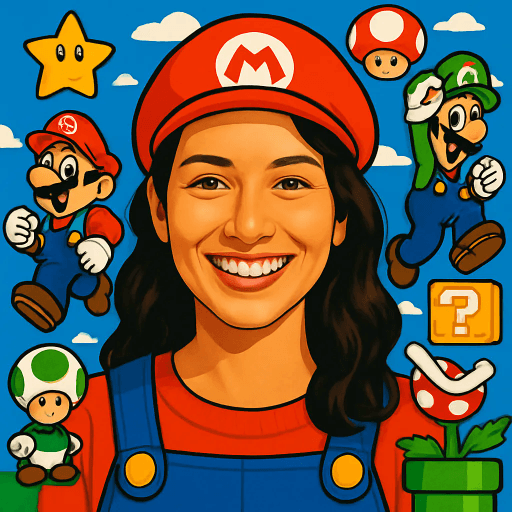
Nintendo has spent four decades building some of the most beloved, instantly recognizable art styles in the world. From the plump cheerfulness of Mario and the earthy greens of Hyrule, to the pastel warmth of Animal Crossing's island life and the ink-splattered energy of Splatoon — Nintendo characters are bright, bold, and unmistakably joyful. Now AI can transform your photo into a Nintendo character in about 60 seconds.
The Nintendo style on MiniFigureAI blends the hallmarks of the Nintendo universe — saturated, candy-bright colors, clean cartoon proportions, friendly round shapes, and game-world elements that make your character look like they belong on a Switch screen. Whether you want a Mario avatar for your gaming profile, an Animal Crossing look for Discord, or a birthday portrait for a Nintendo-obsessed kid, this guide walks you through the whole process.
No design skills. No Photoshop. No app to download. Just your photo and about 60 seconds.
What You'll Need
- A clear photo — a selfie or portrait works best, ideally well-lit and front-facing
- Any web browser on any device (Chrome, Safari, Firefox, Edge)
- About 60 seconds
Step-by-Step Guide
- 1
Visit minifigureai.com
Open your browser and go to minifigureai.com. Your first avatar is completely free — no account required, no credit card needed. Just arrive and start. - 2
Upload your photo
Drag and drop your photo onto the upload area, click to browse your files, or tap the camera icon to use your phone camera directly. JPG, PNG, and WEBP files up to 30MB all work. A clear, front-facing selfie or portrait gives the AI the best material to work with. - 3
Pick "Nintendo" from the style selector
In the style picker, choose Nintendo. You can browse all 30+ styles before confirming. For that bright, saturated, game-character energy, Nintendo is the one. If you want to compare a different gaming aesthetic, the Minecraft style and Pixel Art style are great alternatives right next to it. - 4
AI transforms you in about 30 seconds
Hit generate and the AI gets to work. It analyzes your facial features, expression, hair, and clothing — then reimagines all of it through the Nintendo animation lens. Bright colors, clean cartoon proportions, a friendly rounded face, and that unmistakable Nintendo charm. Most generations complete in 20–40 seconds. - 5
Download and share your Nintendo avatar
Your Nintendo character avatar is ready as a high-resolution PNG. Download it directly to your device, share it to social media or Discord, or save it to your MiniFigureAI account to build a collection. The image is screen-ready and print-ready.
Tips for the Best Results
- Bright, saturated clothing translates well. Nintendo characters wear bold, iconic outfits — think Mario's red overalls, Link's green tunic, Isabelle's yellow dress. If you wear a vibrant, solid-colored outfit in your source photo, the AI often carries that energy forward, giving you a more personalized and character-accurate result.
- Smiling expressions match the cheerful Nintendo aesthetic. Nintendo characters are overwhelmingly joyful. A genuine smile or open, friendly expression gives the AI the perfect raw material for the Nintendo style's signature warmth. Serious or sullen expressions can work, but cheerful ones align best with the source material.
- Works great with kids. Children's rounded features and expressive faces map beautifully onto Nintendo character design. Kids naturally share the same proportions Nintendo artists draw — big eyes, round cheeks, animated expressions. Birthday portraits, school photos, and family snapshots all produce delightful Nintendo avatars.
- Hats and accessories get the full Nintendo treatment. Wearing a hat, glasses, a scarf, or distinctive accessories in your photo? The AI picks them up and gives them Nintendo-style flair — think Mario's red cap, Ash's Pokémon hat, or Link's pointed ears. Accessories add personality and make your avatar more distinctive.
- Compare with Minecraft for a different gaming style. Nintendo gives you a smooth, colorful, animated character look. Minecraft gives you a blocky, voxel-art aesthetic that is completely different in feel. Generate both from the same photo to see two distinct takes on gaming-inspired art — many users keep both for different platforms.
Nintendo style — bright, saturated, game-world character
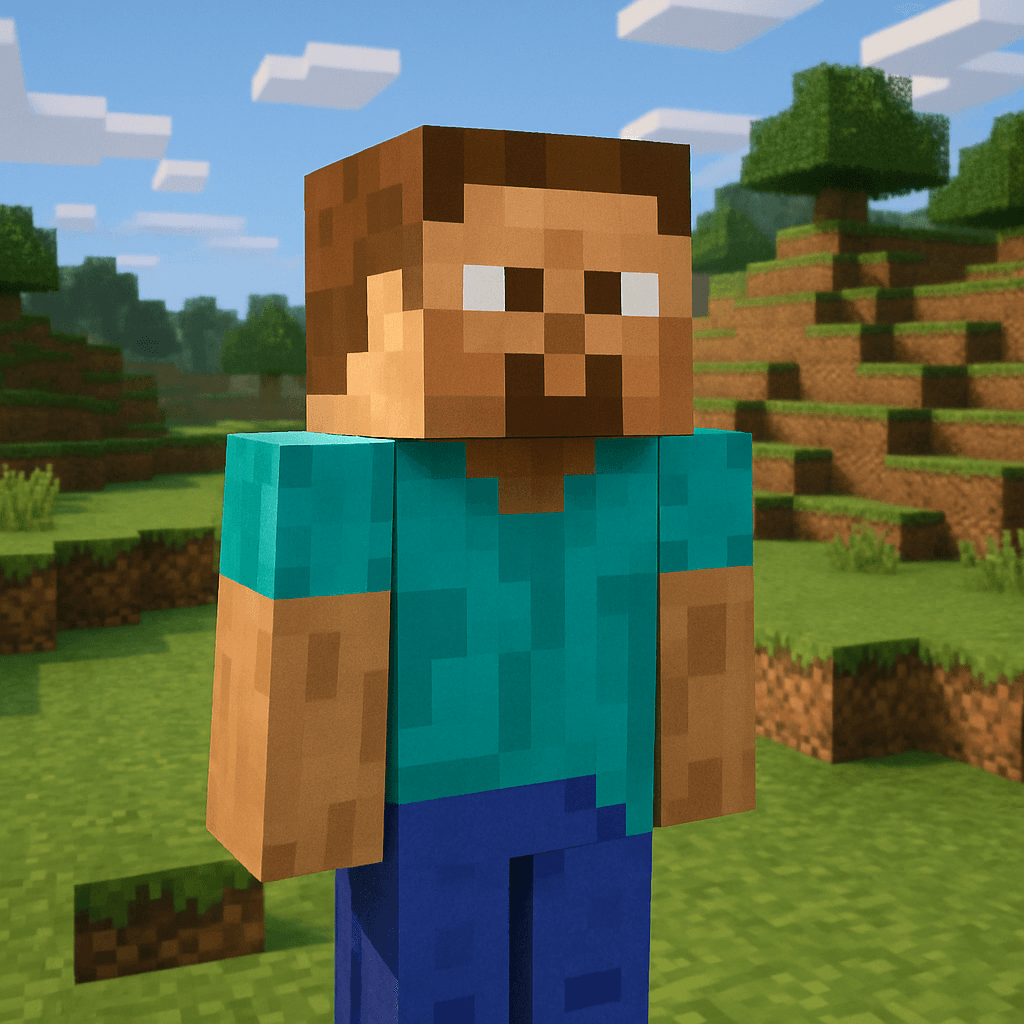
Minecraft style — blocky, voxel, pixel-perfect
The Nintendo Art Style
Nintendo doesn't have one art style — it has a family of them, all unified by a shared visual philosophy. Mario, Zelda, Animal Crossing, and Splatoon look different from each other, but they share the same DNA: approachability, joy, and a visual clarity that works equally well on a giant TV and a handheld screen. The elements that define the Nintendo aesthetic are consistent across the universe.
- Bright, saturated colors. Nintendo palettes are bold and unapologetic. Mario's red, Pikachu's yellow, the turquoise ocean of Animal Crossing's island — these colors are chosen for maximum visual pop and emotional warmth. There are no muted, desaturated palettes in Nintendo's core visual language.
- Clean cartoon proportions. Nintendo characters simplify anatomy into clear, readable silhouettes. Mario has an enormous round head and tiny legs. Link has an idealized heroic build. Isabelle is a sphere with legs. These proportions are not mistakes — they are carefully designed to be instantly legible and deeply charming.
- Friendly expressions. Nintendo character faces are open and expressive by design. Eyebrows communicate everything. Eyes are large and animated. Even villains like Bowser have a cartoonish quality that makes them fun rather than frightening. The effect is a visual world that feels safe and inviting.
- Game-world elements. Nintendo avatars come with context — items, environments, and props that signal their world. Stars, mushrooms, rupees, Nook Miles tickets, ink tanks. When MiniFigureAI renders your Nintendo avatar, it brings these world-building elements into the frame.
When MiniFigureAI applies the Nintendo style to your photo, it translates all of these elements into your portrait — your real facial features and expression reimagined as a resident of the Nintendo universe.
Nintendo Avatar Use Cases
Nintendo-style avatars hit a sweet spot: bright enough to pop in any feed, playful enough to work for kids and adults alike, and culturally universal in a way that very few art styles are.
Gaming Profile Pictures
A Nintendo-style avatar is a natural fit for gaming profiles on Nintendo Switch Online, Steam, Xbox, PlayStation, and anywhere else you represent yourself as a gamer. It signals the culture, looks great as a small thumbnail, and is unmistakably personal — your face, your style.
Discord Servers
Discord gaming communities love personalized avatars. A Nintendo-style portrait stands out in any server — it's more distinctive than a stock image or a plain photo, and it immediately communicates your gaming identity. Perfect for Nintendo fan servers, gaming clubs, and online friend groups.
Birthday Party Themes for Kids
Transform the birthday kid — and every party guest — into a Nintendo character. Use the avatars for invitations, table name cards, party favor bags, or a printed avatar wall. For a Mario-themed or Nintendo-themed birthday party, nothing is more personal than the child's own face in Nintendo character style.
Switch Community Content
Nintendo Switch communities on Reddit, Twitter/X, and YouTube thrive on creative content. A Nintendo-style avatar of yourself is perfect for channel art, community posts, Mii comparisons, or any content where you want to represent yourself in the Nintendo universe. It's shareable, recognizable, and on-brand for the community.
Other Gaming Styles to Try
MiniFigureAI supports a full range of gaming-inspired art styles. If you love the Nintendo look, you might also want to explore these alternatives — each with its own distinct personality.
Minecraft Style
- Blocky voxel character design
- Pixel-grid texture rendering
- Iconic square proportions
- Best for: sandbox game fans
Pixel Art Style
- Retro 8-bit or 16-bit aesthetic
- Crisp pixel grid rendering
- Classic arcade game energy
- Best for: retro gaming nostalgia
RPG Hero Style
- Fantasy RPG character illustration
- Epic armor and weapon details
- Dynamic hero portrait energy
- Best for: fantasy game fans
Not sure which gaming style to pick? Generate Nintendo and Minecraft from the same photo — the contrast between smooth cartoon and blocky voxel is striking. See our Minecraft guide for a full breakdown of that style.
Frequently Asked Questions
Is the Nintendo avatar free?
Yes — your very first avatar is completely free with no account or credit card required. When you sign up for a free account, you also receive 3 additional credits to use on any style, including Nintendo. After that, credit packs start at $2.99.
Which Nintendo style does it use — Mario, Zelda, or Animal Crossing?
The Nintendo style on MiniFigureAI draws from the broader Nintendo visual universe — blending elements from Mario, Zelda, Animal Crossing, and Splatoon. You get the signature bright saturated colors, clean cartoon proportions, and friendly character energy that defines Nintendo across all its franchises. The AI adapts the style to your specific features rather than mapping you to a single game.
Does it work with pets?
Yes! Animal Crossing in particular is famous for its adorable animal villagers, which makes the Nintendo style a great choice for pet photos. Upload a clear photo of your dog, cat, or other pet and let the AI translate them into Nintendo-style characters. The results are often surprisingly charming.
Can I use it for kids' photos?
Absolutely — kids' photos work wonderfully with the Nintendo style. Children's naturally rounded features and expressive faces map directly onto Nintendo's character design language. The cheerful, colorful result is perfect for birthday invitations, party decorations, custom gifts, and keepsakes.
Is the resolution high enough for printing?
Yes. MiniFigureAI generates high-resolution PNG avatars that are suitable for printing. You can use your Nintendo avatar on posters, cards, party decorations, mugs, tote bags, and other printed merchandise. For large-format prints (poster size or bigger), check the pixel dimensions of your generated image before ordering.
Power Up — Create Your Nintendo Avatar
Upload your photo and see yourself transformed into a Nintendo character in under 60 seconds. Free on the first try — no account or credit card required.
Power Up — Create Your Nintendo AvatarNo credit card required · First avatar is free
MiniFigureAI is an independent product and is not affiliated with, endorsed by, or sponsored by LEGO Group, Disney, Pixar, Lucasfilm, Nintendo, Mojang Studios, Marvel, DC Comics, Studio Ghibli, or any other brand mentioned on this page. All trademarks belong to their respective owners. Avatars are AI-generated artwork inspired by popular art styles.