
Sci-Fi & Pop Culture Styles
Turn Yourself into a Star Wars Character with AI (Jedi, Sith, Mandalorian)
March 2026 · 5 min read
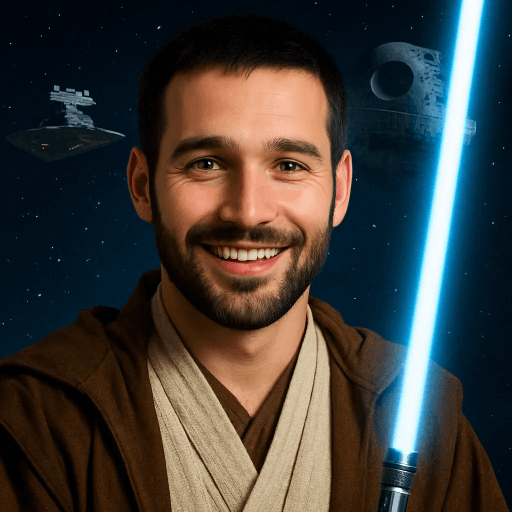
Few fictional universes have captured the human imagination the way Star Wars has. From the hopeful farm boy staring at twin suns on Tatooine to the armored Mandalorian striding through a neon-lit cantina, George Lucas and his successors built a galaxy populated by Jedi guardians, Sith lords, rebel fighters, bounty hunters, and every shade of morality in between. The Original Trilogy gave us the myth. The Prequels showed us the fall. The Sequels handed the saber to a new generation. And The Mandalorian proved the galaxy still has untold stories worth telling.
What if you could step into that galaxy yourself? Not as an extra in the background — as a fully realized Star Wars character, rendered with the cinematic lighting of a blockbuster, wearing Jedi robes or Mandalorian beskar, standing against a backdrop of alien planets and starship corridors. That fantasy is now possible in under 60 seconds with AI.
MiniFigureAI's Star Wars style transforms any photo into a character-driven portrait that belongs in the saga — dramatic lens flares, deep space atmospherics, and the unmistakable aesthetic of a galaxy far, far away. Whether you want to wield a lightsaber as a Jedi or stare stoically through a Mandalorian visor, here's how to create your Star Wars avatar in under a minute.
What You'll Need
- A photo of yourself — a selfie or portrait works best
- A clear, well-lit face (the AI needs facial features to preserve your likeness)
- A browser — no app download needed
- About 60 seconds
Step-by-Step Guide
- 1
Go to minifigureai.com
Open minifigureai.com in any browser — works on mobile, tablet, or desktop. No account or sign-up required to try your first avatar. The site loads the style gallery immediately so you can preview the Star Wars aesthetic before uploading. - 2
Upload your photo
Tap or click the upload area and select your photo. A clear, front-facing portrait gives the AI the most to work with — Star Wars character renders especially benefit from visible facial features since the style layers cinematic lighting and costume details over your real likeness. - 3
Select "Star Wars" from the style chips
- 4
Wait about 30 seconds
The AI processes your photo — mapping your facial features onto a Star Wars character, selecting appropriate costume elements (robes, armor, or gear depending on your photo), and compositing you into a cinematic Star Wars environment. Generation typically completes in 20–40 seconds. - 5
Download, share, or try another style
Once your avatar is ready, download the high-resolution PNG for printing or posting. Share directly to social media, or hit Try Another Style to generate a Marvel or DC version for a different kind of hero portrait. Many users run Star Wars and Marvel side by side to see which universe fits their look.
Tips for the Best Results
- The AI adapts your clothing to Star Wars attire. Whatever you're wearing in your photo becomes the starting point — the AI transforms it into Jedi robes, Mandalorian armor, or a rebel flight suit. Wearing something with structure (a jacket, a vest, a hoodie) gives the AI more to work with for the costume transformation.
- Accessories get the sci-fi treatment. Glasses become targeting visors. Jewelry transforms into futuristic insignia. Hats can become Mandalorian helmets or Jedi hoods. The more distinctive your accessories, the more interesting the Star Wars interpretation tends to be.
- Works with groups — create your squad. Upload a photo with friends or family and the AI renders the entire group in Star Wars style. Perfect for fan groups, cosplay crews, or anyone who wants a matching set of Star Wars character portraits. Group renders often produce a natural mix of character archetypes across the people in the photo.
- Dramatic lighting is a signature of the output. Star Wars cinematography is defined by high-contrast light and shadow — think the red glow of a Sith cave or the golden desert light of Tatooine. The AI applies this cinematic lighting over your portrait. Photos taken in natural, directional light (not flat overhead fluorescents) tend to produce the most dramatic Star Wars results.
- Try alongside Marvel for different hero styles. Star Wars and Marvel are the two most-compared styles on MiniFigureAI. Both render you as a hero, but the aesthetics are distinct — Star Wars is cinematic and cosmic, Marvel is bold comic-book energy. Generating both from the same photo is one of the most popular side-by-side comparisons on the platform.
Star Wars style — cinematic, galactic
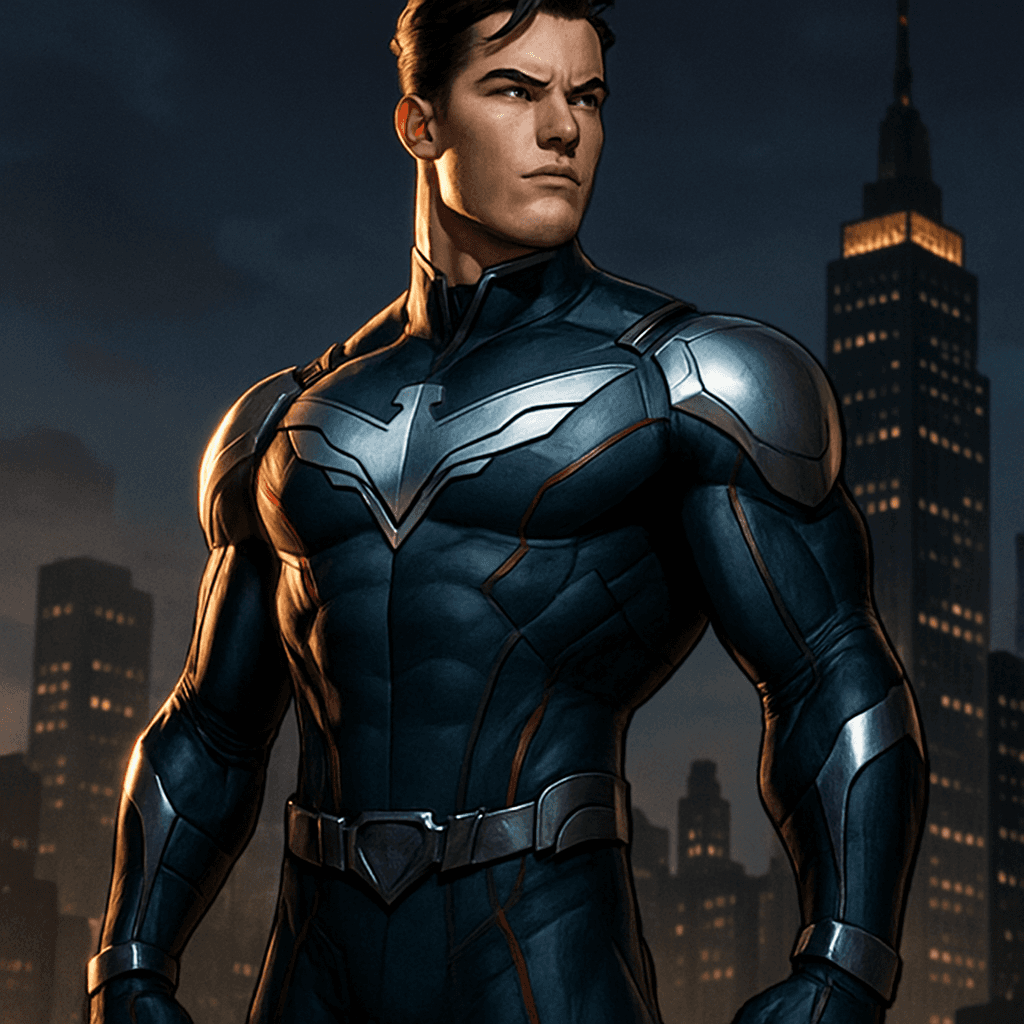
Marvel style — for hero style comparison
What the Star Wars Style Creates
The Star Wars visual universe is one of the most codified in cinema — four decades of production design have established a recognizable aesthetic language that the AI draws on to transform your photo. Here is what the style renders:
- Jedi robes and Sith armor. The costume design of Star Wars is immediately recognizable — the layered brown robes of the Jedi Order, the black angular armor of the Sith, the beskar plate of Mandalorian warriors. The AI adapts your clothing into these iconic costume archetypes while preserving your physical likeness.
- Starship and planet environments. Your portrait is composited into environments pulled from the Star Wars visual vocabulary — asteroid fields, the corridors of Imperial Star Destroyers, the temples of Yavin 4, the desert planes of Tatooine, the misty forests of Endor. Each render places you in a context that feels native to the saga.
- Cinematic lens flares. J.J. Abrams popularized the anamorphic lens flare as a signature of the sequel trilogy, but dramatic light streaking has been part of Star Wars cinematography from the beginning. The AI applies this effect to give portraits the feel of a production still from the films.
- Alien planet atmospherics. The color grading shifts to match the light of the Star Wars setting — the amber haze of Tatooine's binary sunset, the green atmosphere of Dagobah, the cold blue of Hoth. This environmental color grading is what makes the output feel cinematic rather than like a simple costume overlay.
Star Wars Avatar Use Cases
Star Wars AI avatars have found a surprisingly broad range of uses beyond the obvious social media post:
- Cosplay inspiration. Before committing to a full cosplay build, many cosplayers use the Star Wars style to visualize themselves in different character archetypes — Jedi vs. Sith vs. Mandalorian — to see which one resonates before purchasing materials. The AI render gives a realistic preview of how your features translate to each costume type.
- Profile pictures for gamers and fan communities. Star Wars avatars are among the most popular profile pictures across gaming platforms (Steam, Xbox, Discord) and fan communities (Reddit, Discord servers, fan forums). A cinematic, character-driven portrait stands out far more than a casual selfie.
- Party invitations and event graphics. Star Wars-themed birthday parties, watch parties for new Disney+ releases, and fan gatherings all benefit from personalized graphics. A Star Wars avatar of the guest of honor — or the whole group — makes for a memorable invitation header or event banner.
- Fan community content. Fan fiction writers, YouTube creators, and fan art communities use Star Wars avatars as character references, channel branding, and community identity graphics. A high-quality AI render provides a consistent visual identity that hand-drawn fan art might not match in speed or detail.
Frequently Asked Questions
Is the Star Wars AI avatar generator free?
Your first avatar on MiniFigureAI is completely free — no credit card required, no account needed. The Star Wars style is available on the free tier alongside all other styles. Additional generations are available with a paid plan.
What Star Wars outfit will I get?
The AI generates a Star Wars character based on your photo's lighting, clothing, and overall composition. Results tend toward Jedi robes, Mandalorian armor, or rebel/imperial gear depending on the visual cues in your photo. The output is always cinematic and character-driven — not a generic costume overlay.
Can I choose between Jedi and Sith?
MiniFigureAI applies the Star Wars style automatically based on your photo — the AI makes the creative interpretation rather than you selecting a specific character class. If you want a different result, try uploading a different photo or re-generating. The AI sometimes produces different archetypes across renders from the same photo.
Will my face still look like me?
Yes — likeness preservation is a core priority of the MiniFigureAI style engine. The Star Wars render transforms your costume, environment, and lighting while keeping your facial features recognizable. The result is you as a Star Wars character, not a generic character that happens to be wearing Star Wars costumes.
Does the Star Wars style work with pets?
Yes. Upload a photo of your dog, cat, or other pet and the AI will render them in Star Wars style — think a Wookiee-adjacent companion or a sleek feline Sith familiar. Pet Star Wars portraits are consistently among the most-shared outputs on MiniFigureAI.
Join the Galaxy — Create Your Star Wars Avatar
Upload your photo and generate a cinematic Star Wars character portrait in under 60 seconds — Jedi robes, Mandalorian armor, alien planet backgrounds. Free to try, no account required.
Create Your Star Wars AvatarNo credit card required · First avatar is free
MiniFigureAI is an independent product and is not affiliated with, endorsed by, or sponsored by LEGO Group, Disney, Pixar, Lucasfilm, Nintendo, Mojang Studios, Marvel, DC Comics, Studio Ghibli, or any other brand mentioned on this page. All trademarks belong to their respective owners. Avatars are AI-generated artwork inspired by popular art styles.