
MiniFigureAI Guide
How to Turn Yourself into a Disney Character Using AI
March 2026 · 5 min read
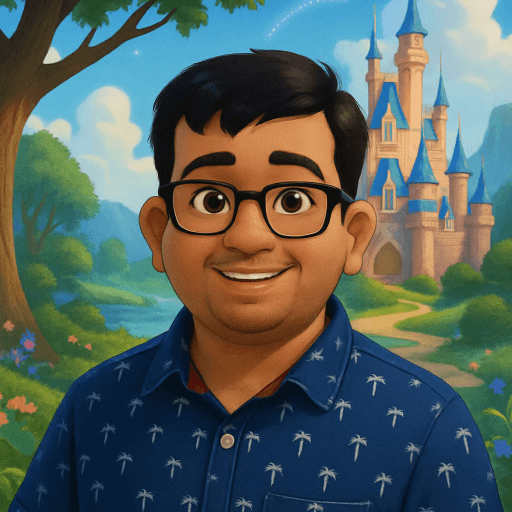
Ever watched Frozen, Tangled, or Moana and imagined yourself stepping into that world — luminous eyes, a warm painterly glow, hair that flows like it belongs in an animated kingdom? Disney has spent decades perfecting one of the most recognizable and beloved art styles on the planet. Now, AI makes it possible to place yourself inside that world in under 60 seconds.
The Disney style on MiniFigureAI captures the hallmarks of the modern Disney era — the large, soulful eyes that communicate every emotion, the soft rounded facial features, the warm cinematic lighting, and the whimsical atmosphere that makes every frame feel like a still from a feature film. Whether you want to see yourself as a Disney princess, a Disney hero, or just want a breathtaking AI avatar, this guide walks you through the whole process.
No design skills. No Photoshop. No app to download. Just your photo and about 60 seconds.
What You'll Need
- A clear photo — a selfie or portrait works best, ideally well-lit and front-facing
- Any web browser on any device (Chrome, Safari, Firefox, Edge)
- About 60 seconds
Step-by-Step Guide
- 1
Visit minifigureai.com
Open your browser and go to minifigureai.com. Your first avatar is completely free — no account required, no credit card needed. Just arrive and start. - 2
Upload your photo
Drag and drop your photo onto the upload area, click to browse your files, or tap the camera icon to use your phone camera directly. JPG, PNG, and WEBP files up to 30MB all work. A clear, front-facing selfie or portrait gives the AI the best material to work with. - 3
Pick "Disney" from the style selector
In the style picker, choose Disney. You can browse all 30+ styles before confirming — but for that iconic large-eyed, warm-lit, fairy-tale look, Disney is the one. If you want to compare a 3D animated feel, the Pixar style is right next to it. - 4
AI transforms you in about 30 seconds
Hit generate and the AI gets to work. It analyzes your facial features, expression, skin tone, hair, and clothing — then reimagines all of it through the Disney animation lens. Large eyes, soft contours, warm magic-hour lighting. Most generations complete in 20–40 seconds. - 5
Download and share your Disney self
Your Disney avatar is ready as a high-resolution PNG. Download it directly to your device, share it to social media, or save it to your MiniFigureAI account if you want to keep a collection. The image is print-ready and screen-ready.
Tips for the Best Results
- Clear facial features give the best Disney eyes. The Disney style is defined by expressive, detailed eyes. A well-lit, in-focus photo where your eyes are clearly visible will produce the most striking result. Avoid sunglasses, heavy shadows across the face, or extreme backlighting.
- Colorful clothing translates into character outfits. Disney characters are famous for their iconic, color-saturated costumes. If you wear a vibrant outfit in your source photo — a bold red dress, a bright blue jacket — the AI often incorporates that palette into your character's look, giving you a more personalized result.
- Natural expressions work better than posed. A genuine smile, a thoughtful look, or a relaxed neutral expression gives the AI authentic emotion to work with. Disney animation is all about conveying feeling — the more natural your expression, the more emotionally resonant your avatar.
- Works great with kids' photos. Children's faces translate beautifully into the Disney style — the rounded features and expressive quality of kids' expressions align perfectly with Disney's character design language. Birthday photos, school portraits, and family photos all produce magical results.
- Try Disney alongside Pixar for different takes. Disney gives you a 2D hand-drawn inspired look — the flat warmth of Tangled and Frozen. Pixar gives you a 3D rendered feel with more volumetric lighting. Generate both from the same photo and pick the one that resonates more.
Disney style — 2D, warm, fairy-tale magic
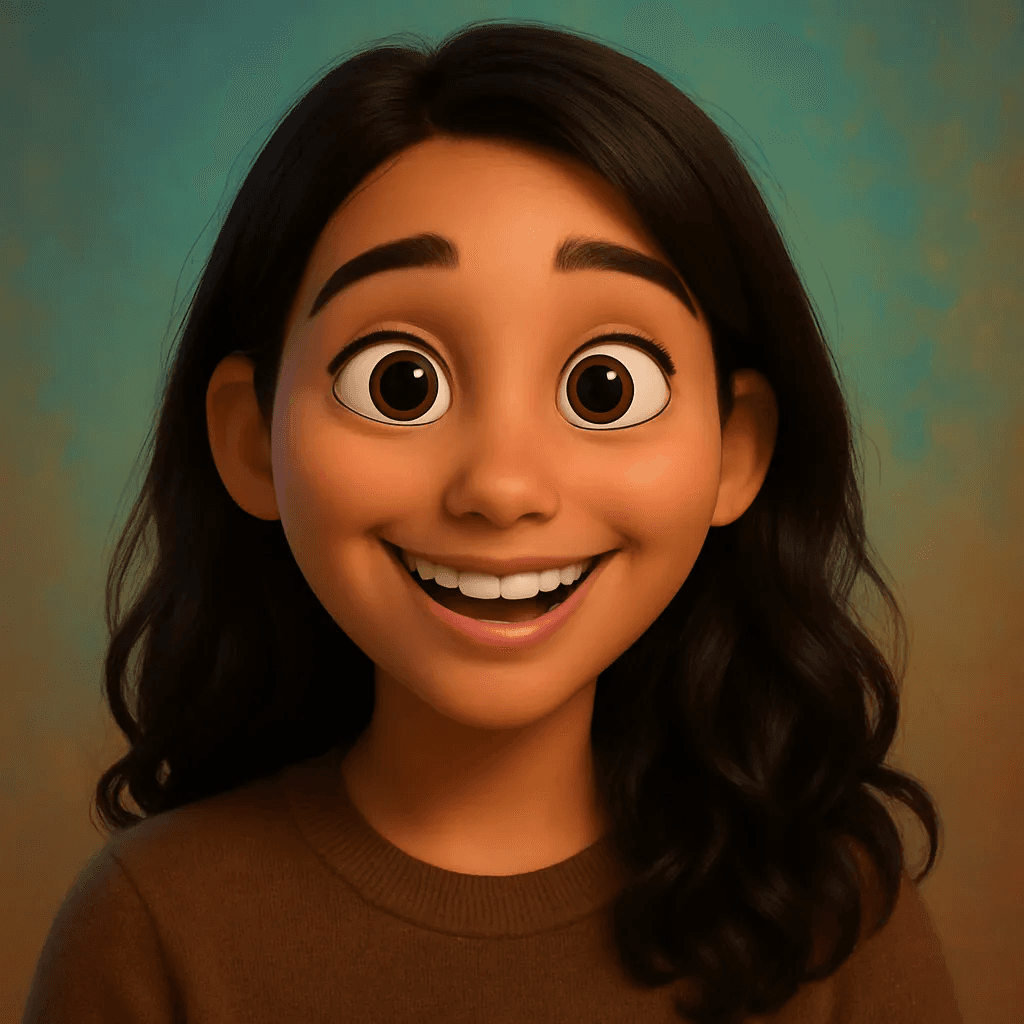
Pixar style — 3D, volumetric, expressive
The Disney Art Style — What Makes It Magical?
Disney's modern animation era — spanning Frozen, Tangled, Brave, Moana, Encanto, and Wish — shares a remarkably consistent visual language. It's not an accident. Disney's character design philosophy has been refined over decades of storytelling, and the elements that define it are deeply intentional.
- Large, expressive eyes. Disney eyes are the emotional engine of every character. They're disproportionately large relative to real-world anatomy, hyper-detailed in their irises, and capable of communicating a full spectrum of emotion with just a subtle shift in pupil or lid position. This is a deliberate design choice rooted in animation's ability to exaggerate for emotional truth.
- Soft, rounded facial features. Disney characters have smooth, idealized faces with subtle contours. No harsh angles. Cheekbones are gentle, chins are refined, noses are stylized and small. The effect is approachable and warm — you immediately trust the character.
- Warm, cinematic lighting. Think of the golden hour light in Tangled's lantern scene, the aurora-lit nights in Frozen, the tropical warmth of Moana's ocean setting. Disney lighting is always intentionally evocative — it creates atmosphere as much as it illuminates characters.
- Whimsical, saturated atmospheres. Disney backgrounds are vivid and deeply rendered, but they exist to support the character, not compete with them. Color palettes are warm and inviting, with painterly skies and rich environments that feel like places you'd want to live in.
When MiniFigureAI applies the Disney style to your photo, it's translating all of these elements into your portrait — your real facial structure reimagined through this iconic artistic lens.
Pixar vs Disney — Which Style Is Right for You?
Both are from the same creative universe, but Disney and Pixar have meaningfully different visual identities. Choosing between them comes down to the look and feeling you want.
Disney Style
- 2D hand-drawn aesthetic
- Flat, painterly color fields
- Extremely large, luminous eyes
- Princess and hero character energy
- Warm fairy-tale atmosphere
- Best for: fantasy, dreamlike, storybook feel
Pixar Style
- 3D rendered, volumetric look
- Subsurface skin shading and depth
- More realistic proportions
- Grounded emotional storytelling energy
- Cinematic lighting and shadows
- Best for: relatable, character-driven feel
Not sure which to pick? Generate both from the same photo and compare. Many people love having both versions — the Disney one for fantasy-themed content and the Pixar one for profile pictures and gifts. See our Pixar guide for the full breakdown on that style.
Perfect Occasions for Disney Avatars
Disney-style avatars hit a sweet spot: they're unmistakably magical, universally loved across age groups, and immediately recognizable. That makes them perfect for a range of occasions.
Birthday Invitations
Turn the birthday person into a Disney character and use their avatar as the centerpiece of a digital or printed invitation. A Disney-style portrait says "this is a magical occasion" immediately — far more personal and imaginative than a stock illustration.
Kids' Party Themes
Transform every child at the party into their own Disney character. Print them as name cards, decorate the table with their avatars, or give each kid a printout of their own character as a party favor. It's the kind of personalized touch that kids remember for years.
Profile Pictures
A Disney avatar makes an extraordinary profile picture — visually stunning, unmistakably you, and conversation-starting. Works beautifully on Instagram, TikTok, WhatsApp, Discord, and anywhere else a photo thumbnail matters. It's the profile picture that people actually ask about.
Gifts for Disney Fans
Know someone who loves Disney? Their own face reimagined as a Disney character is a genuinely one-of-a-kind gift. Print it as a poster, frame it, add it to a custom card, or use it on a mug or tote. It's personal, creative, and impossible to buy anywhere else.
Frequently Asked Questions
Is the Disney avatar free?
Yes — your very first avatar is completely free with no account or credit card required. When you sign up for a free account, you also receive 3 additional credits to use on any style, including Disney. After that, credit packs start at $2.99.
What Disney style is it based on — Frozen, Tangled, which era?
The Disney style on MiniFigureAI draws from the modern Disney Renaissance — primarily the aesthetic of Frozen, Tangled, Moana, and Encanto. This era is defined by large expressive eyes, soft rounded features, warm painterly lighting, and vivid saturated atmospheres. It captures the look of a Disney princess or hero from a current-era feature film.
Can I make my whole family into Disney characters?
Absolutely. You can generate a Disney avatar for each family member separately — just upload each person's photo individually and select the Disney style. Many families use their collective avatars for holiday cards, custom art prints, or personalized gifts. Kids' photos translate especially well into the Disney style.
How realistic is the likeness?
The AI captures your key facial features — eye shape, face structure, hair color and style, and overall expression — and translates them into the Disney art style. The result looks like a Disney character that is clearly based on you. For the best likeness, use a clear, well-lit, front-facing photo.
What is the difference between Disney and Pixar styles?
Disney gives you a 2D, hand-drawn inspired aesthetic with flat painterly colors and very large, luminous eyes — the look of Frozen, Tangled, and Moana. Pixar gives you a 3D rendered look with volumetric lighting, depth, and more realistic proportions — the feel of Up, Inside Out, or Coco. Both are stunning, and many users generate both from the same photo to compare.
Create Your Disney-Inspired Avatar
Upload your photo and see yourself transformed into a Disney character in under 60 seconds. Free on the first try — no account or credit card required.
Try Disney Style FreeNo credit card required · First avatar is free
MiniFigureAI is an independent product and is not affiliated with, endorsed by, or sponsored by LEGO Group, Disney, Pixar, Lucasfilm, Nintendo, Mojang Studios, Marvel, DC Comics, Studio Ghibli, or any other brand mentioned on this page. All trademarks belong to their respective owners. Avatars are AI-generated artwork inspired by popular art styles.