
Anime & Art Styles
How to Turn Yourself into a Studio Ghibli Character with AI
March 2026 · 5 min read
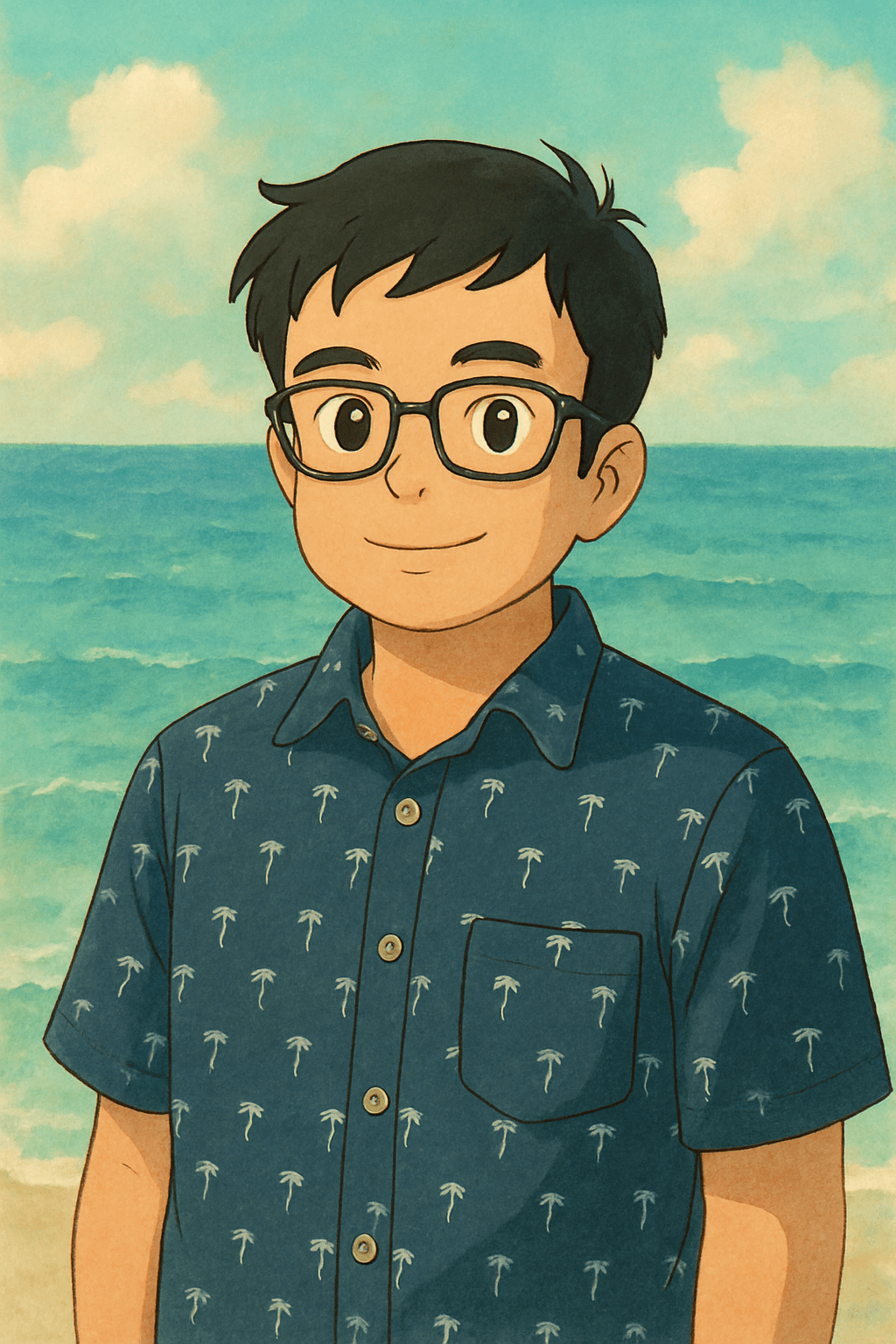
Studio Ghibli's art style is unlike anything else in animation history. From the lush forest spirits of My Neighbor Totoro to the bathhouse world of Spirited Away, Hayao Miyazaki and his team built a visual language so distinctive that a single frame is instantly recognizable — soft watercolor washes, warm amber and jade tones, expressive eyes that carry entire emotional arcs, and backgrounds so detailed they feel lived-in. It's no accident that Ghibli films have grossed over $2 billion worldwide and remain the most critically acclaimed animated features ever made.
In early 2025, a wave of AI-generated Ghibli-style portraits swept social media. The trend — turning real photos into hand-painted Ghibli characters — went viral across TikTok, Instagram, and X, with millions of people sharing their transformations. What made it resonate wasn't just novelty; it was the emotional warmth of seeing yourself rendered in an art style that carries decades of cinematic love.
MiniFigureAI's Ghibli style was built to capture exactly what makes that art direction special: the soft, slightly desaturated watercolor textures, the characteristic large almond-shaped eyes, the warm color palette borrowed from Miyazaki's golden-hour cinematography, and the sense of gentle wonder that defines every frame of a Ghibli film. Below is a step-by-step guide to generating your own Ghibli avatar in under 60 seconds.
What You'll Need
- A photo of yourself — a selfie or portrait works best
- Natural or soft indoor lighting (harsh flash washes out the warm palette)
- A browser — no app download needed
- About 60 seconds
Step-by-Step Guide
- 1
Go to minifigureai.com
Open minifigureai.com in any browser — works on mobile, tablet, or desktop. No account or sign-up required to try your first avatar. - 2
Upload your photo
Tap or click the upload area and select your photo. A clear, front-facing portrait gives the AI the most to work with — the Ghibli style especially benefits from seeing your facial features clearly since it renders expressive, character-driven eyes. - 3
Select "Ghibli" from the style chips
Scroll through the style selector and choose Ghibli. You'll see a preview chip showing the soft watercolor aesthetic. The style chip gallery also shows other options like Disney, Pixar, and Shonen Anime if you want to compare results afterward. - 4
Wait about 30 seconds
The AI processes your photo and applies the Ghibli style — painting in the characteristic soft textures, adjusting the color palette to Miyazaki's warm tones, and rendering the expressive eyes the style is known for. Generation typically completes in 20–40 seconds. - 5
Download, share, or try another style
Once your avatar is ready, download the high-resolution PNG for printing or posting. Use the share buttons to post directly to social media, or hit Try Another Style to generate a Disney or Pixar version for comparison. Many people keep several variants — Ghibli for its painterly warmth, Pixar for the 3D character look.
Tips for the Best Results
- Natural lighting is your best friend. Ghibli's warm palette is built on golden-hour cinematography. A photo taken near a window or outdoors in soft daylight gives the AI more warm-tone information to work with, and the result feels truer to the Miyazaki aesthetic than a harsh flash selfie.
- Outdoor and nature backgrounds translate beautifully. Ghibli is famous for its lush, nature-inspired environments — think the camphor tree in Totoro or the flower garden in Howl's Moving Castle. If your photo has a park, garden, or open sky in the background, the AI will incorporate those elements into the Ghibli setting.
- The AI preserves your hair color and clothing. Your distinctive features carry over — hair color, glasses, and clothing style all inform the generated character. That's what makes Ghibli avatars feel personal rather than generic: the character is unmistakably you, just rendered in watercolor.
- Works with couples and groups too. Upload a photo with a partner, a friend, or even your pet, and the AI will render the full scene in Ghibli style. Group Ghibli portraits make excellent phone wallpapers, profile pictures, or printed gifts — especially for Ghibli fans who'd recognize the style immediately.
- Try Ghibli alongside Disney or Pixar for a style comparison. All three styles share a warmth and character-focus, but each has a distinct aesthetic. Ghibli is painterly and organic; Disney is clean line art with expressive proportions; Pixar is fully rendered 3D. Generating all three from the same photo is a popular TikTok format that consistently gets strong engagement.
Ghibli style — soft watercolors, warm palette
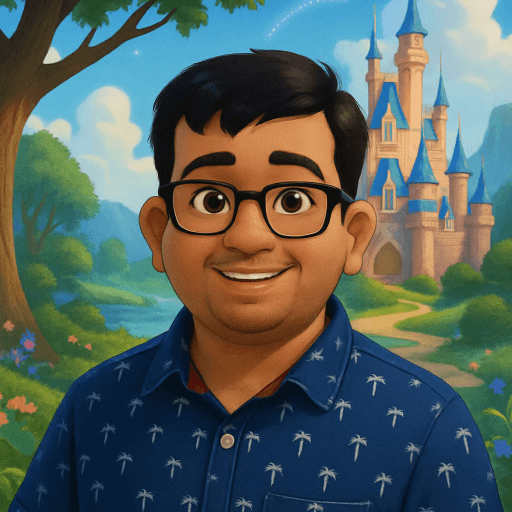
Disney style — for style comparison
What Makes the Ghibli Style Special?
Studio Ghibli's visual identity wasn't designed in a committee or driven by commercial trends — it evolved from Hayao Miyazaki's personal obsessions: hand-painted European landscapes, the texture of Japanese countryside, the weight of watercolor on paper. Each of the following elements is intentional and consistent across the studio's 40-year body of work.
- Watercolor textures. Unlike the clean vector art of American animation studios, Ghibli backgrounds and character shading use visible brushstrokes and color bleeding. This gives the art a tactile, handmade quality that digital animation typically loses.
- Nature-inspired backgrounds. Whether it's the cloud-cities of Castle in the Sky or the coastal town of Kiki's Delivery Service, Ghibli environments are saturated with organic detail — moving grass, dappled light through leaves, rain that accumulates on surfaces. Backgrounds in Ghibli films took longer to paint than character animation.
- Expressive, large eyes. Ghibli characters communicate enormous emotional range through eye design — large, reflective, and drawn with enough detail to carry close-up emotional scenes without dialogue. The eyes are typically the last element painted in character scenes.
- Warm, desaturated color palette. Ghibli's palette tends toward amber, jade, dusty rose, and soft sky blue — warm but not oversaturated. This deliberate restraint is what gives the films their nostalgic, dream-like quality. Colors are muted in shadows and luminous in highlights.
Other Anime Styles to Try
Ghibli is one of several anime-adjacent art styles available on MiniFigureAI. Each has a distinct visual character and community:
- Shonen Anime — high-energy line art inspired by series like Naruto, Dragon Ball, and My Hero Academia. Bold outlines, dynamic poses, and vibrant color palettes. Ideal for anyone who grew up on Saturday morning anime.
- Chibi — the super-deformed, adorable style from Japanese fan culture. Large heads, tiny bodies, oversized eyes. Chibi avatars are wildly popular for profile pictures and stickers — the cuteness factor is impossible to resist.
- Cyberpunk Anime — neon-drenched, dystopian cityscapes inspired by Akira and Ghost in the Shell. High contrast, electric blues and purples, rain-slicked streets. The aesthetic counterpoint to Ghibli's warmth.
Browse all available styles on the MiniFigureAI home page — the style gallery shows sample outputs so you can compare aesthetics before uploading your photo.
Frequently Asked Questions
Is the Ghibli style free?
Your first avatar on MiniFigureAI is completely free — no credit card required, no account needed. The Ghibli style is available on the free tier alongside all other styles. Additional generations are available with a paid plan.
How is this different from ChatGPT's Ghibli filter?
ChatGPT's image generation applies a general Ghibli-inspired style but doesn't specialize in portrait-to-avatar transformations. MiniFigureAI is purpose-built for turning real photos into stylized avatars — it preserves facial likeness, hair color, and distinctive features while applying the Ghibli art style. The result is a character that looks like you, not just a generic Ghibli scene.
What photo works best for the Ghibli style?
A clear, front-facing portrait with good lighting works best. Natural daylight is ideal — Ghibli's warm palette is enhanced when the AI has warm-tone source material to work with. Avoid photos with harsh shadows across the face or very dark backgrounds. Outdoor photos with natural elements in the background often produce especially evocative results.
Can I use my Ghibli avatar for commercial purposes?
Avatars generated on MiniFigureAI are yours to use for personal projects, social media, profile pictures, and printed gifts. For commercial use — merchandise, client deliverables, or commercial advertising — check the current terms of service on minifigureai.com for the most up-to-date licensing details.
What other anime styles are available?
MiniFigureAI offers Shonen Anime, Chibi, and Cyberpunk Anime in addition to Ghibli. Non-anime styles include Disney, Pixar, Marvel, DC, Star Wars, Minifigure, Pixel Art, Watercolor, Oil Painting, and more. Browse the full style gallery on the home page.
See Yourself in the World of Ghibli
Upload your photo and generate a Studio Ghibli-style avatar in under 60 seconds. Soft watercolors, warm Miyazaki palette — free to try, no account required.
Try Ghibli Style FreeNo credit card required · First avatar is free
MiniFigureAI is an independent product and is not affiliated with, endorsed by, or sponsored by LEGO Group, Disney, Pixar, Lucasfilm, Nintendo, Mojang Studios, Marvel, DC Comics, Studio Ghibli, or any other brand mentioned on this page. All trademarks belong to their respective owners. Avatars are AI-generated artwork inspired by popular art styles.