
Art Styles & Painting
Turn Your Photo into a Watercolor Painting with AI
March 2026 · 5 min read
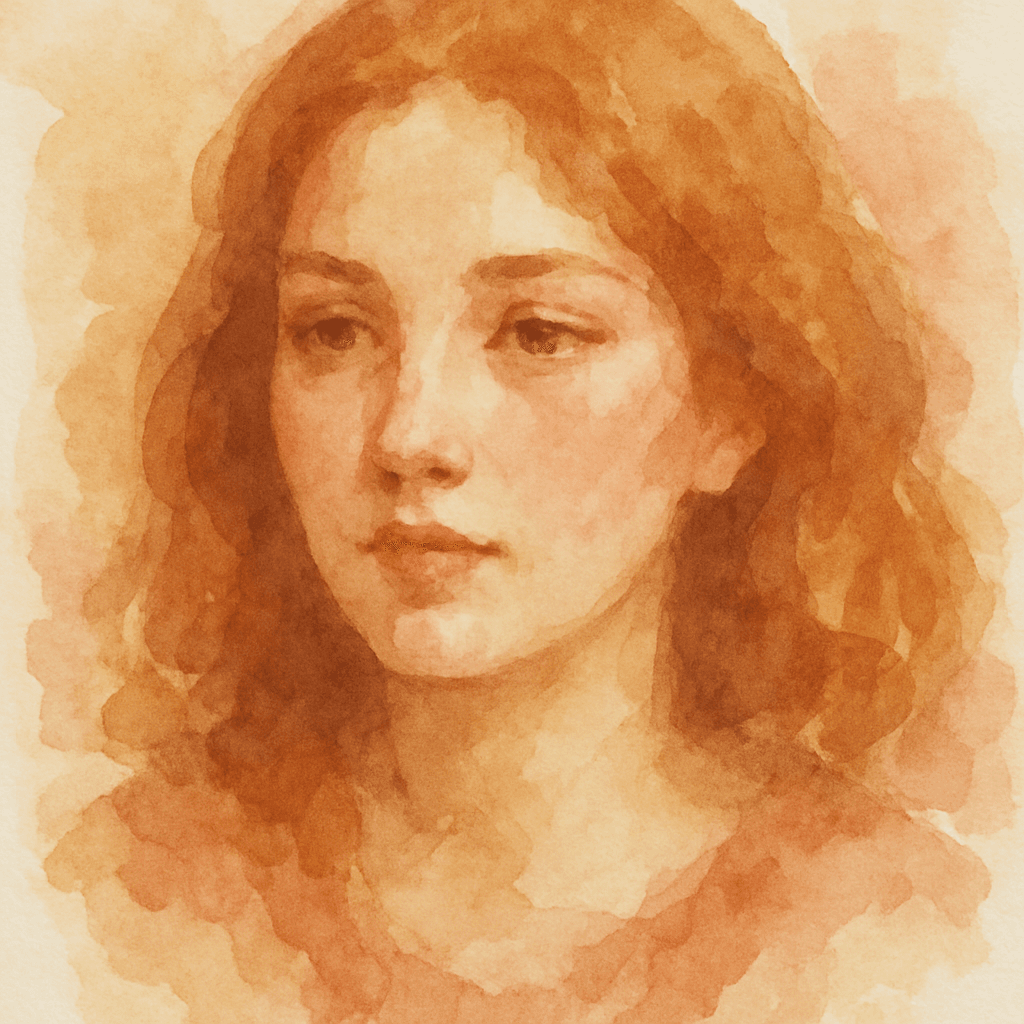
Watercolor painting is one of the most beautiful and difficult traditional art forms — the way pigments bloom on wet paper, the translucent layering, the visible brushstrokes. Mastering it takes years of practice: controlling the water-to-pigment ratio, knowing when to let colors bleed and when to hold a crisp edge, understanding how a wash dries two shades lighter than it looks wet. The results, when done well, have an organic warmth that no other medium quite matches.
Now AI can transform any photo into a soft, hand-painted watercolor portrait in 60 seconds. No art skills required. The AI captures the defining qualities of the medium — the wet-on-wet color blooming, the translucent pigment layers, the natural color bleeding at edges, the warm ochre, rose, and cerulean palette — and applies them to your photo with the fidelity of a trained artist.
Whether you want a portrait to frame, a personalized gift, or simply the most beautiful version of a photo you love, the watercolor style turns it into something that looks genuinely hand-crafted.
What You'll Need
- A photo of yourself, a pet, or anyone you want to immortalize in watercolor
- A clear, well-lit portrait — front-facing works best
- Any web browser on any device (mobile, tablet, or desktop)
- About 60 seconds
Step-by-Step Guide
- 1
Go to minifigureai.com
Open minifigureai.com in any browser. Your first avatar is completely free — no account or credit card required. The style gallery loads immediately so you can browse before uploading. - 2
Upload your photo
Drag and drop your photo onto the upload area, or tap to browse your files. JPG, PNG, and WEBP files up to 30MB all work. A clear, well-lit portrait — whether a selfie, a professional photo, or a snapshot — gives the AI the most to work with. Natural lighting produces the warmest watercolor tones. - 3
Select "Watercolor" from the style chips
In the style picker, choose Watercolor. The chip shows a sample output so you know exactly what the style looks like before you commit. You can also browse Oil Painting right next to it to compare the two traditional art styles before generating. - 4
Wait about 30 seconds
The AI analyzes your photo and applies the watercolor transformation — building up translucent pigment layers, adding wet-on-wet color blooms, rendering visible brushstrokes, and letting the warm watercolor palette breathe naturally across the composition. Generation typically completes in 20–40 seconds. - 5
Download, share, or try another style
Once your watercolor portrait is ready, download the high-resolution PNG. Print it, frame it, or share it directly from the app. Hit Try Another Style to generate an Oil Painting version from the same photo — the side-by-side comparison between the two traditional art styles is one of the most popular ways to explore what suits your portrait best.
Tips for the Best Results
- Natural lighting gives the warmest watercolor tones. Watercolor is a warm, organic medium — and photos taken in natural daylight give the AI the color information it needs to replicate that warmth authentically. Harsh flash photography or cool artificial lighting can produce flatter results. A window-lit portrait on an overcast day is ideal.
- Simple backgrounds become beautiful abstract washes. In traditional watercolor, backgrounds are often treated as loose, expressive color fields rather than detailed scenes. The AI follows the same logic: simple or plain backgrounds are transformed into soft, painterly washes that complement the portrait without competing with it. Busy or cluttered backgrounds can produce noisier results.
- Portraits with soft expressions work best. Watercolor portraits have a contemplative, intimate quality — they suit soft, relaxed, or gently smiling expressions better than wide-open grins or intense stares. The medium naturally conveys emotion through color and texture rather than through exaggerated facial features, so a quieter expression often produces the most compelling final portrait.
- The AI preserves key facial details while adding artistic flourish. Unlike some AI art styles that aggressively stylize or distort, the watercolor style is designed to remain recognizable. Facial features, hair color, and distinctive details are preserved — the AI adds the painterly treatment on top rather than replacing what makes you look like you.
- Compare with Oil Painting for a different traditional art feel. Watercolor and oil painting are both traditional media but with very different visual characters. Watercolor is light, translucent, and warm — oil painting is rich, textured, and deep. Generating both from the same photo is a revealing comparison: some portraits feel more alive in the delicate watercolor style, others command attention better in the dense, luminous quality of oil.
Watercolor style — translucent pigment, warm palette

Oil Painting style — rich texture, deep color
The Watercolor Art Style
Watercolor has a distinct visual language that sets it apart from every other painting medium. The AI captures each of the defining characteristics that make a genuine watercolor portrait immediately recognizable:
- Visible brushstrokes. In watercolor, the marks of the brush are not hidden — they are part of the beauty. Wide flat washes, loose gestural strokes, and fine detail work all coexist in the same painting, giving the surface a layered, hand-crafted quality that catches the eye differently from every angle.
- Wet-on-wet color blooming. When wet pigment meets a wet surface, colors expand and bloom in soft, organic patterns that no other medium can replicate. This blooming effect — a wash of rose bleeding into ochre, a cerulean shadow spreading beneath an eye — is the most characteristically “watercolor” quality in the final portrait.
- Natural color bleeding. Watercolor does not respect hard edges the way oil or acrylic paint can. Colors bleed into each other at boundaries, creating soft transitions that feel natural and alive rather than mechanically precise. The AI uses this quality to soften transitions between light and shadow, giving skin tones a luminous, breathing quality.
- Warm ochre, rose, and cerulean palette. Traditional watercolor portraiture favors a specific palette: warm earth tones in the lights, cool cerulean blues in the shadows, rose and vermillion in the cheeks and lips. This palette has centuries of tradition behind it and reads immediately as “fine art portrait” in a way that more saturated modern palettes do not.
- White paper showing through. In watercolor, the white of the paper is the lightest value — there is no white paint. Highlights are created by reserving bare paper, and the texture of the paper itself becomes part of the painting surface. The AI replicates this quality, letting the lightest areas of the portrait retain a fresh, airy quality that feels genuinely painted rather than digitally generated.
Perfect Gift Ideas
A custom watercolor portrait is one of the most personal and thoughtful gifts you can give — it transforms an ordinary photo into something that looks like a commissioned piece of fine art. Here are the occasions where watercolor portraits make the most meaningful impact:
- Framed portrait prints. A watercolor portrait printed on matte fine art paper and framed looks genuinely indistinguishable from a hand-painted original at normal viewing distance. It is the kind of gift people hang on their walls rather than putting in a drawer — and it costs a fraction of what a commissioned portrait artist would charge.
- Anniversary and birthday gifts. A watercolor portrait of a couple, a family, or an individual on a milestone birthday has an intimacy and warmth that a standard photo print cannot match. The painted quality elevates it from “nice photo” to “piece of art.” It is the kind of gift that prompts the question: “Where did you find an artist who could do this so quickly?”
- Pet portraits as keepsakes. Watercolor has a long tradition as the medium of choice for pet portraits — the soft, warm palette suits animal subjects beautifully, and the loose handling of the background keeps the focus on the animal's face and character. A watercolor portrait of a beloved pet makes a deeply personal keepsake, and for pets who have passed, a memorial portrait in this style is a genuinely touching tribute.
- Couple portraits. Watercolor's romantic, impressionistic quality makes it a natural fit for couple portraits — engagement photos, wedding images, or even a casual snapshot of two people who matter to each other. The soft color bleeding and warm palette give couple portraits a nostalgic, timeless feeling that suits the subject.
Other Art Styles to Try
Watercolor is one end of the traditional art spectrum — soft, translucent, and warm. MiniFigureAI offers a range of other painting and illustration styles that take the same portrait in a completely different direction:
- Oil Painting — rich, dense, luminous. Where watercolor is light and translucent, oil painting is the opposite: deep color, impasto texture, dramatic chiaroscuro lighting. The same portrait that feels delicate in watercolor commands attention as an oil painting. Think Old Masters — Rembrandt, Vermeer, Sargent.
- Pop Art — bold outlines, flat color fields, Ben-Day dots, Warhol-inspired graphic energy. Pop Art turns a portrait into a statement piece rather than a quiet work of fine art. Maximum visual impact, zero subtlety — the stylistic opposite of watercolor in every respect.
- Comic Book — dynamic ink lines, halftone shading, superhero-era illustration quality. Comic Book style takes the same portrait and gives it the energy of a Marvel or DC page — bold, graphic, action-ready.
- Renaissance — sfumato shading, Flemish color depth, the formal gravity of a 15th-century commission. Renaissance style gives portraits the most historically weighty treatment available — you look like you could hang in the Uffizi. Closer in spirit to watercolor's fine art aspiration, but in the richer, deeper medium of the Old Masters.
Browse all available styles on the MiniFigureAI home page — the style gallery shows sample outputs for every option so you can compare the full range before uploading your photo.
Frequently Asked Questions
Is the watercolor portrait generator free?
Yes — your first avatar on MiniFigureAI is completely free with no account or credit card required. The watercolor style is available on the free tier alongside all other styles. When you create a free account, you receive additional credits for further generations.
What resolution is the output — can I print it?
MiniFigureAI generates high-resolution PNG files suitable for printing. The output is sharp enough for framed prints up to 8×10 inches at standard print resolution, and performs well on canvas prints, greeting cards, mugs, and fine art paper. Watercolor style is particularly well-suited for printing because the soft, organic quality of the medium actually improves at larger sizes.
How realistic does the watercolor portrait look?
The watercolor style produces results that closely replicate the visual qualities of a hand-painted watercolor portrait — translucent pigment layers, wet-on-wet color blooming, visible brushstrokes, and the warm ochre-rose-cerulean palette typical of traditional watercolor portraiture. Facial features and key details are preserved so the portrait remains recognizably you. Most people find the results convincingly painterly at normal viewing distance.
Does the watercolor style work with pet photos?
Yes — pet portraits are one of the most popular uses for the watercolor style. The warm, soft quality of watercolor suits animal subjects beautifully, and the AI handles both the animal subject and the simplified painterly background well. Use a clear, well-lit photo of your pet with a reasonably simple background for the best results.
What's the difference between watercolor and oil painting styles?
Watercolor and oil painting are both traditional media but with opposite visual characters. Watercolor is light, translucent, and warm — the palette is delicate, colors bloom softly, and the overall feeling is airy and intimate. Oil painting is dense, rich, and luminous — colors are deep, texture is visible, and the overall feeling is weighty and formal. Watercolor portraits feel impressionistic and warm; oil painting portraits feel like Old Master commissions. Both are available on MiniFigureAI and generating both from the same photo is the best way to see which suits your portrait.
Create Your Watercolor Portrait
Upload your photo and get a soft, hand-painted watercolor portrait in under 60 seconds. Translucent pigment layers, visible brushstrokes, warm palette — free to try, no account required.
Create Your Watercolor PortraitNo credit card required · First avatar is free
MiniFigureAI is an independent product and is not affiliated with, endorsed by, or sponsored by LEGO Group, Disney, Pixar, Lucasfilm, Nintendo, Mojang Studios, Marvel, DC Comics, Studio Ghibli, or any other brand mentioned on this page. All trademarks belong to their respective owners. Avatars are AI-generated artwork inspired by popular art styles.