
MiniFigureAI Guide
Turn Your Photo into Pixel Art with AI — Retro Avatar Maker
March 2026 · 5 min read
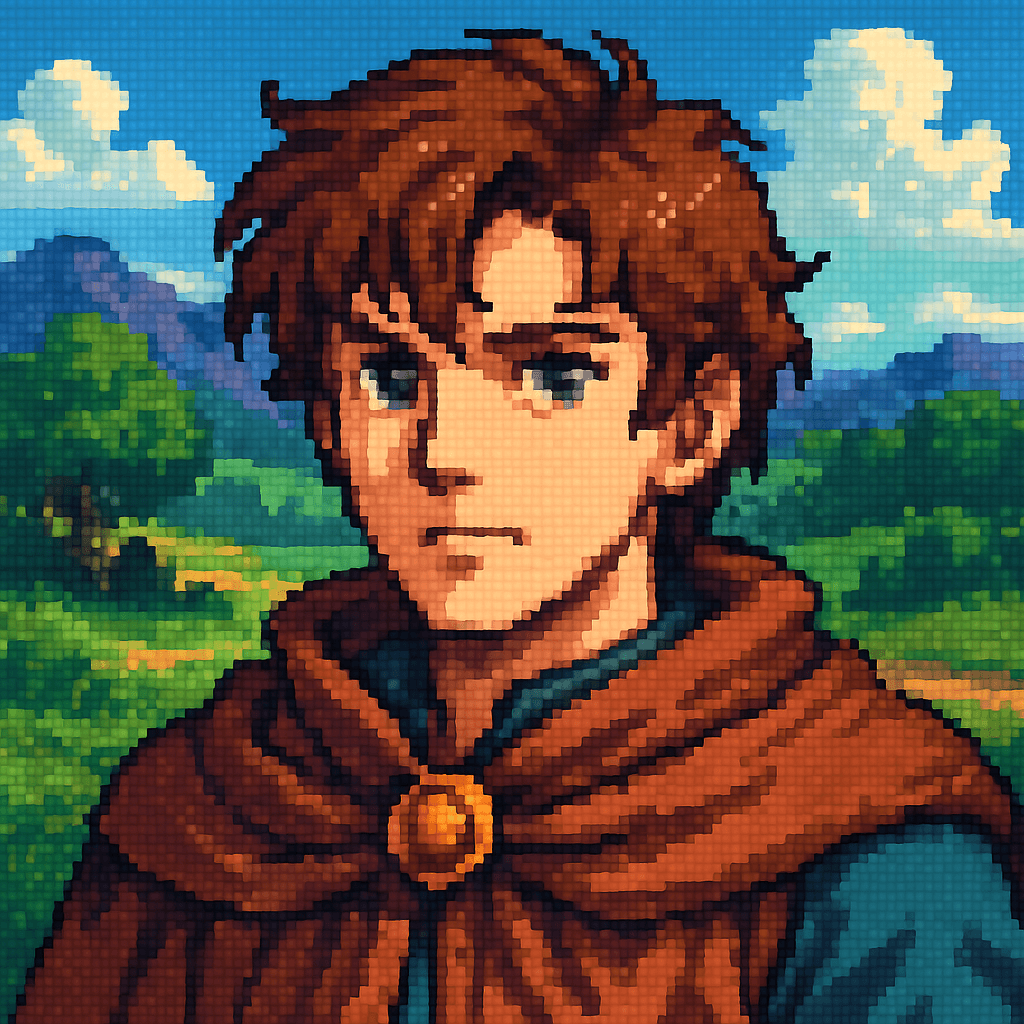
Pixel art is timeless — from 8-bit NES classics to modern indie games like Celeste and Stardew Valley. The aesthetic has never gone out of style: limited palettes, expressive dithering, and every single pixel placed with intention. Now you can transform any photo into a detailed pixel art portrait in the style of 16-bit SNES-era RPGs. AI handles the pixelation, dithering, and limited color palette automatically.
MiniFigureAI's pixel art avatar generator reads your facial features, hair, skin tone, and clothing — then rebuilds every detail as a hand-crafted looking sprite straight out of a 1990s RPG. The result is a pixel art selfie that feels authentically retro, not just a filtered photo. Whether you want a retro avatar maker result for your Discord profile, a gaming icon for Twitch, or a unique piece of digital art that looks like it belongs in a classic RPG, this is the fastest way to get one.
Takes 60 seconds. Free to try. No app to download, no account required for your first avatar.
What You'll Need
- A photo — a selfie, portrait, or any shot with a clearly visible face (JPG, PNG, or WEBP up to 30MB)
- A web browser (Chrome, Safari, Firefox, or Edge — works on any device)
- About 60 seconds
Step-by-Step Guide
- 1
Go to minifigureai.com
Open your browser and visit minifigureai.com. No sign-up or account is required for your first free avatar — the upload area is ready immediately on the homepage. - 2
Upload your photo
Drag and drop your photo onto the upload area, click to browse your files, or on mobile tap the button to open your camera roll. Well-lit selfies and portraits with a clearly visible face produce the sharpest pixel art results. JPG, PNG, and WEBP files up to 30MB all work. - 3
Select the Pixel Art style
In the style picker, choose "Pixel Art" from the available options. This is the 16-bit SNES-era RPG style that transforms your photo into a retro sprite portrait. You can also browse 50+ other styles to compare — but for the classic pixel art aesthetic, this is your pick. - 4
Wait about 30 seconds
Hit generate and let the AI work. The model analyzes your photo — reading your facial structure, hair color, skin tone, and clothing — and rebuilds every detail as a pixel art sprite. The AI applies authentic dithering and palette reduction automatically. Most generations complete in 20–40 seconds. - 5
Download and share your pixel art avatar
Your pixel art selfie is ready. Download it as a high-resolution PNG, share it straight to social media, or save it to your MiniFigureAI dashboard if you've created a free account. The image is optimized for profile pictures, Discord avatars, Twitch icons, and digital printing. Want to compare styles? Your uploaded photo stays available — just select another style and generate again. Try the Pixel Art style now.
Tips for the Best Results
- High contrast photos work best. Pixel art thrives on clear light-to-dark transitions. A well-lit photo with strong contrast between your face and the background gives the AI more to work with — resulting in sharper, more expressive pixel detail.
- Simple backgrounds let the pixel detail shine. Busy or cluttered backgrounds compete with the pixel art effect. A plain wall, a solid-color backdrop, or an outdoor shot with open sky behind you keeps the focus on your portrait and lets the dithering and palette work do their job.
- The AI uses authentic dithering techniques. Unlike simple photo filters, MiniFigureAI applies genuine dithering — a technique used in classic games to simulate gradients within a limited color palette. The result looks hand-crafted, not processed. It's what makes the output feel like real pixel art rather than a blurry low-resolution photo.
- Compare with Minecraft for a 3D pixel alternative. Pixel art is flat and 2D — the classic sprite style. If you prefer a 3D voxel look with blocky depth, try the Minecraft style side by side. Both are rooted in the same retro-gaming aesthetic but express it in very different ways.
- Great for retro gaming aesthetic branding. Pixel art avatars are immediately recognizable as part of gaming culture. If you stream retro games, run an indie game dev account, or just want a profile picture with personality, the pixel art style signals exactly the right vibe at a glance.
Pixel Art style — 2D retro sprite with authentic dithering
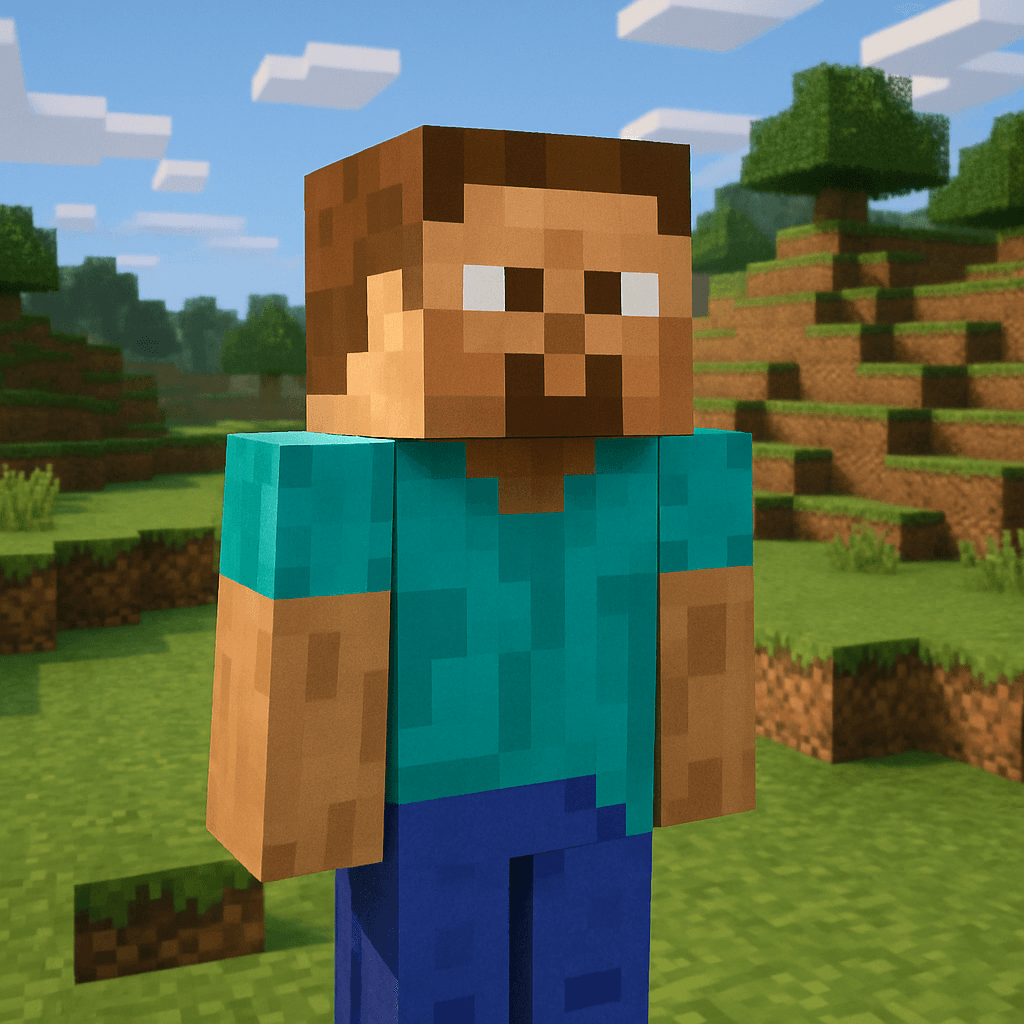
Minecraft style — 3D voxel alternative to the flat pixel look
The Pixel Art Aesthetic
Classic pixel art is defined by a specific set of visual constraints — and those constraints are exactly what make it beautiful. The style emerged in the 1980s and reached its creative peak in the 16-bit SNES era, when artists had to craft detailed, expressive characters within strict hardware limits. Games like Chrono Trigger, Final Fantasy VI, and Secret of Mana pushed the format to its artistic height — portraits full of personality, built from just a few hundred pixels each.
When MiniFigureAI generates your pixel art avatar, it recreates these defining qualities:
- 16-bit resolution and proportions — your portrait is rendered at the characteristic sprite size of SNES-era RPG characters: compact, expressive, and perfectly readable at small sizes
- Limited color palette — colors are quantized to a restricted set, just as they were on original hardware. The constraint forces visual harmony and gives the image that unmistakable retro look
- Authentic dithering — the AI applies pattern-based dithering to simulate smooth gradients within the limited palette, the same technique pixel artists have used since the 1980s to create the illusion of more colors than are actually present
- Retro environmental backgrounds — your sprite is placed against backgrounds inspired by classic RPG environments: stone dungeons, forest clearings, village interiors, or scrolling landscapes that look like they belong in a 16-bit adventure game
The result is a portrait that looks hand-crafted — like a real pixel artist spent time translating your photo into sprite form. Except it takes 60 seconds instead of hours.
Perfect Uses for Your Pixel Art Avatar
A pixel art portrait is more versatile than you might expect. Here are the best ways to put yours to use:
Gaming Profiles and Handles
Your pixel art avatar signals gaming identity instantly. Use it as your profile picture on Steam, Xbox, PlayStation Network, Nintendo Switch, or any gaming platform where a retro aesthetic fits. It tells other players who you are before you say a word — and stands out in a sea of photographs and generic icons.
Indie Game Dev Avatars
If you make indie games — especially retro-inspired ones — a pixel art avatar of yourself is the natural choice for your developer profile on itch.io, Game Jolt, or social media. It aligns your personal brand with the aesthetic of your work and signals authenticity to the retro game dev community.
Retro-Themed Social Media
Pixel art is consistently popular on Twitter/X, Instagram, and TikTok — especially in gaming and creative communities. A personalized pixel art portrait makes a striking profile picture that stands out from conventional photos while fitting naturally into retro-aesthetic feeds and communities.
Print as Posters or Stickers
Because the pixel art style is deliberately low-resolution by design, it scales beautifully when printed large — each pixel becomes a visible tile, turning your portrait into an art print. Print it as a poster, make it into stickers, or use it on merch. The blocky aesthetic only gets better at larger sizes.
Discord and Twitch Branding
Discord and Twitch are full of retro gaming communities where pixel art is the dominant visual language. A custom pixel art avatar of yourself — rather than a stock sprite or a generic icon — establishes a personal brand that's both on-theme and uniquely yours. Use it for your avatar, channel icon, sub badge design inspiration, or Discord server profile.
Other Styles to Explore
Pixel art is one of MiniFigureAI's most popular retro styles, but there are plenty of others worth trying once you've got your sprite:
- Minecraft — the 3D voxel alternative: blocky cubic proportions, pixelated textures, and terrain backgrounds straight from the game
- Nintendo — vibrant, expressive character art inspired by the colorful world of Nintendo games
- Anime — Japanese animation style with expressive eyes, clean linework, and anime-style coloring
Your uploaded photo stays on file across all styles — try any combination without re-uploading. Every avatar is ready in under 60 seconds.
Frequently Asked Questions
Is the pixel art avatar generator free?
Yes — your very first avatar is completely free with no credit card required. Create a free account and receive 3 additional credits usable on any style. After that, credit packages start at $2.99 and never expire.
What makes this different from just applying a pixelation filter?
A basic pixelation filter just reduces resolution — it doesn't look like real pixel art. MiniFigureAI applies authentic dithering, intelligent palette reduction, and sprite-proportion remapping to create something that looks hand-crafted. The result resembles a portrait a skilled pixel artist might create — not a blurry low-resolution photo.
What resolution is the generated pixel art avatar?
Your avatar is delivered as a high-resolution PNG. The pixel art style is intentionally low-resolution in aesthetic — but the output file is sized appropriately for profile pictures, social media, and digital printing. When printed large, the visible pixel grid becomes part of the art.
Can I use my pixel art avatar on merch or for commercial purposes?
Yes — avatars generated with MiniFigureAI are yours to use for personal and commercial purposes, including printing on merch, using in marketing materials, or as part of a game or creative project. Check the terms of service for full licensing details.
Does the pixel art generator work on mobile?
Yes — MiniFigureAI runs entirely in your mobile browser with no app required. On iOS or Android, tap the upload button to access your camera roll directly, choose the Pixel Art style, and your retro avatar is ready in about 30 seconds.
Pixelate Yourself
Upload your photo and see yourself as a 16-bit pixel art sprite. Free to try — no account needed for your first avatar. Ready in under 60 seconds.
Pixelate YourselfNo credit card required · First avatar is free
MiniFigureAI is an independent product and is not affiliated with, endorsed by, or sponsored by LEGO Group, Disney, Pixar, Lucasfilm, Nintendo, Mojang Studios, Marvel, DC Comics, Studio Ghibli, or any other brand mentioned on this page. All trademarks belong to their respective owners. Avatars are AI-generated artwork inspired by popular art styles.